
[Connectivity] All about Elhi and WiFi compatibility
- Get link
- X
- Other Apps
It's very easy to check if you have a 2.4 GHz Wifi Connection.
Open up your WiFi menu on your computer and see if there are multiple options (SSID) with your WiFi's name.
- See if there are multiple similar network names (SSID), for example:
"elhi_wifi" and "elhi_wifi_5G"
"elhi_wifi" and "elhi_wifi 5.0"
"elhi_wifi" and "elhi_wifi5"
"elhi_wifi 2G" and "elhi_wifi" - If there are multiple similar networks, the one with either 2G, 2GHz, or nothing extra in the name is most likely the 2.4GHz WiFi network.
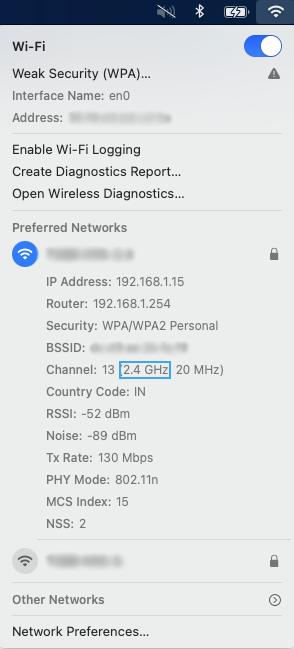
We would recommend you to connect to the Wifi and check through your computer settings. If you are using a Mac follow the below steps:
- Click on the WiFi icon in the top navbar while holding down the Option/Alt key.
- You will see detailed information in grey about your Wi-Fi. In the middle, it will show which channel your Wi-Fi is using.
- “Channel” will either say in the brackets 2.4GHz or 5GHz.
Elhi is purposely made to use 2.4GHz instead of 5GHz. Why? This is because Elhi needs a longer range and also has a very small data transfer requirement.
- Longer Range: 2.4 GHz band has a longer range and can penetrate solid objects more easily than the 5 GHz band, making it ideal for Elhi.
- Small Packet Size: With Longer Range we need to compromise on data transmission speeds. But Elhi doesn't need to get data from the internet, instead, it works on the LAN, thus very high-speed data transfer is not required.
Mostly Yes! In the current world scenario, most of the access point / wireless router manufacturers offer 2.4Ghz and 5Ghz bands in the same hardware. This means that even though they appear as two different Networks on your computer, they are ideally the same LAN (Local Area Network). Thus you can in fact connect your Elhi to the 2.4Ghz network and your computer to the 5Ghz network.
Having said that, please note that in order to configure your Elhi device to the 2.4 Ghz network, you will first need to connect your computer to that Wifi so that the same appears in the configuration dropdown.
- Get link
- X
- Other Apps